

If you run an online course using Tutor LMS, you already know how powerful the Content Drip feature is for keeping students on track. But if you’ve ever tried to give a specific user-like a VIP student, a beta tester, or a co-instructor-early access to all lessons, you’ve likely hit a massive roadblock.
I recently needed to disable the drip schedule for just a handful of specific email addresses. When I searched for a solution, even Google’s AI Overview gave me a blunt answer: “You cannot natively disable it for only specific or limited users.”
The internet’s consensus was that you either turn off Content Drip for everyone, or you buy an expensive, bloated third-party membership plugin to create complex access tiers.
As a developer, “impossible” is usually just an invitation to dig into the code. So, I built a custom, lightweight solution that does exactly what they said couldn’t be done.
The Problem with Native Drip Functionality
Tutor LMS handles its drip functionality globally or at the course level. When the drip engine fires, it aggressively filters the lesson, quiz, and assignment content based on the schedule you set.
This rigid logic creates real-world bottlenecks:
- Course Testing: Admins and QA testers have to wait days or weeks to see content naturally unlock, making testing a nightmare.
- VIP Members: You can’t easily grant immediate, unrestricted access to premium buyers or scholarship students without affecting the rest of the cohort.
- Sales Demos: If you want to show a potential partner your entire curriculum, you can’t seamlessly bypass the drip.
The Solution: A Dedicated Drip Override Engine
Instead of relying on heavy membership plugins to rewrite user roles, I decided to target the exact filters Tutor LMS uses to hide content. By intercepting these filters right as WordPress initializes, we can tell the system to look the other way if the current user is on an approved list.
I packaged this logic into a dedicated, modular WordPress plugin: Tutor LMS Drip Override.
Key Features Under the Hood
- Surgical Precision: The plugin hooks into
tutor_lesson/single/content,tutor_quiz/single/wrapper, andtutor_assignment/single/content. If an authorized user logs in, it removes the drip filters instantly, granting them full access. - Zero Bloat: No massive database tables, no complicated role re-assignments, and no heavy JavaScript libraries. It relies entirely on native WordPress core functionality.
- A SaaS-Grade Interface: I hate cluttered WordPress dashboards. I built the settings page with a minimal, black-and-white SaaS aesthetic. Adding and removing authorized email addresses takes seconds with dynamic, AJAX-free DOM manipulation.
- Enterprise Security: The backend is fully secured using WordPress nonces, capability checks, and aggressive data sanitization to ensure only authorized admins can manage the bypass list.
How to Use the Drip Override Plugin
I designed this to be as frictionless as possible. You don’t need to touch a single line of PHP to manage your users.
- Install and Activate: Upload the plugin
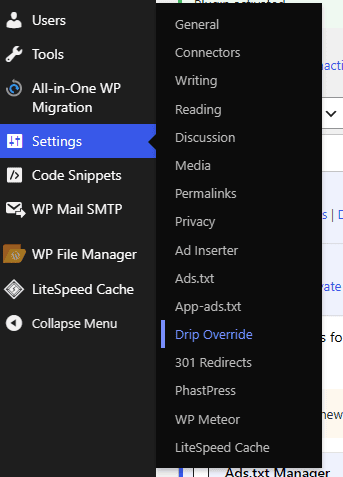
.zipfile via your WordPress admin panel (Plugins > Add New) and click Activate. - Navigate to Settings: In your WordPress dashboard, go to
Settings > Drip Override. - Enable the Engine: Toggle the Enable Override Engine switch at the top of the interface. This acts as a master kill-switch if you ever need to temporarily pause the overrides without deleting your email list.
- Add Your Users: Click the + Add Email Address button. Type in the email of the student, tester, or VIP you want to bypass the drip. You can add as many rows as you need.
- Save Configuration: Hit save, and the next time those specific users log in, they will have instant, unrestricted access to your entire curriculum.
What’s Next?
Finding a documented “impossible” problem and engineering a native, clean solution is why I love WordPress development.
If you are an agency owner or course creator struggling with rigid LMS limitations, you don’t always need to buy another subscription plugin. Sometimes, you just need a targeted piece of code.
Want a copy of the plugin? Click here