
Introduction: The Webinar Funnel That Looked Perfect
I remember sitting in front of a client project late at night, staring at a landing page that looked almost too good.
The Elementor design was clean. The headline was strong. The countdown timer worked. The registration form worked. The payment flow worked. Even the mobile version looked decent.
On paper, everything was ready.
But registrations were coming in slowly.
That was the frustrating part.
We had spent hours fixing spacing, adjusting typography, compressing images, checking buttons and testing the form on different devices. I thought we had built a good landing page.
Then I looked at the entire journey instead of the page.
That changed everything.
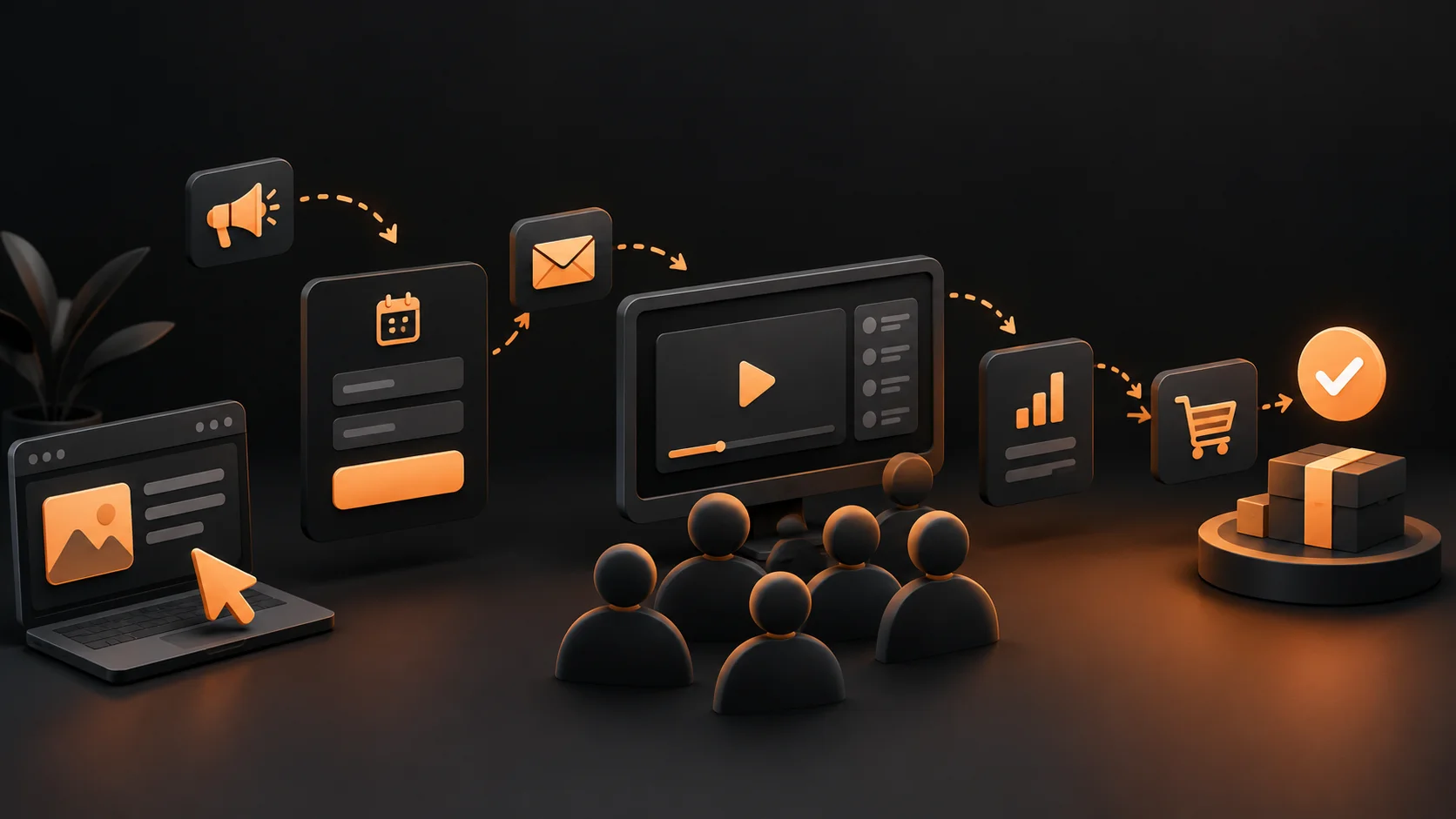
The visitor wasn’t simply looking at a landing page. They were moving through a sequence: an advertisement or search result, a registration page, an email reminder, the webinar, an offer, a checkout page and finally a purchase.
The landing page was only one piece of the machine.
That was my first big lesson about webinar funnels.
A beautiful page cannot rescue a broken funnel.
I’m Ayushman Jena, a website developer and UI/UX designer who works on landing pages, conversion optimization, SEO and WordPress projects. Over the years, I’ve worked with Elementor, WooCommerce, payment systems such as Razorpay, different hosting environments and plenty of websites where the problem wasn’t where everyone initially thought it was.
And if you’re trying to understand What is a Webinar Funnel?, I’d rather explain it the way I learned it through actual projects instead of giving you a dictionary definition.
A webinar funnel is the complete journey that moves someone from first discovering a webinar to registering, attending, trusting the presenter and taking the desired action afterward.
The important word there is journey.
A webinar funnel isn’t just a webinar registration page.
And it isn’t just an email sequence either.
It’s the system connecting all those pieces.
Insight: The first mistake I see is treating the registration page as the funnel. The funnel starts before the visitor reaches your page and continues after the webinar ends.
1. The Moment I Realized a Webinar Funnel Is Really a Sales Journey
One client had a webinar that cost around ₹2,000 to ₹5,000 in advertising for every small batch of registrations. The team was convinced the problem was traffic.
“We just need more people,” they told me.
Maybe.
But before spending another rupee, I wanted to see what happened to the people already arriving.
We tracked the basic numbers.
- Landing page visitors
- Registration percentage
- Confirmation page visits
- Email open and click rates
- Live webinar attendance
- Offer-page visits
- Checkout starts
- Completed payments
And there it was.
The page was getting traffic. The registration rate wasn’t terrible either. But a large percentage of registered users never showed up for the webinar.
That meant the business wasn’t only losing people at the landing page.
It was losing them between registration and attendance.
This is where a WordPress SEO Guide becomes more useful when you stop thinking only about rankings and start thinking about the entire visitor experience.
SEO might bring the visitor in. Design convinces them to register. Email gets them back. The webinar creates trust. The offer explains the next step. The checkout removes friction.
Every stage has a job.
The five stages I normally look at
Stage 1: Discovery. Someone sees your content, Google listing, social post, YouTube video, advertisement or referral.
Stage 2: Registration. The visitor lands on a page explaining why the webinar is worth their time.
Stage 3: Attendance. Automated reminders increase the chance that registration turns into an actual attendee.
Stage 4: Conversion. During or after the webinar, the visitor receives a relevant offer.
Stage 5: Follow-up. People who didn’t buy immediately receive useful follow-up messages instead of disappearing from the system.
Once you see it this way, the design decisions become much easier.
Should the registration page have ten navigation links?
Probably not.
Should the checkout page suddenly introduce five unrelated offers?
Definitely not.
Should someone who registered but missed the webinar receive a replay?
Absolutely.
Insight: A good funnel gives every visitor one clear next action. Confusion is conversion friction.
2. What Actually Happens Inside a Webinar Funnel?
Let’s make this practical.
Imagine you’re selling a ₹9,999 online course for freelancers in India. Instead of immediately asking someone to buy, you invite them to a free webinar called something like “How to Get Your First 5 High-Paying Clients Without Cold Calling.”
The funnel might look like this:
Traffic → Landing Page → Registration → Confirmation → Reminder Emails → Webinar → Offer → Checkout → Payment → Follow-up
That’s the simple version.
The real version has branches.
| Stage | Visitor action | What can go wrong | What I would optimize |
|---|---|---|---|
| Traffic | Clicks or visits | Wrong audience | Message and targeting |
| Landing page | Reads the offer | Weak value proposition | Headline, proof, CTA |
| Registration | Submits details | Too many fields | Shorter form |
| Confirmation | Confirms attendance | No clear instructions | Calendar and reminders |
| Webinar | Watches | Low engagement | Structure and presentation |
| Offer | Considers buying | Weak transition | Relevant offer and proof |
| Checkout | Starts payment | Friction or trust issues | UX, speed and payment flow |
| Follow-up | Returns later | No sequence | Segmented emails |
This is why I often tell clients that building a WordPress SEO Guide around isolated SEO tasks isn’t enough for a funnel business. The website needs to support the entire conversion path.
Where WordPress fits
WordPress can handle a surprising amount of this system.
You can build the landing page in Elementor, collect registrations through a form plugin, send information to an email platform, host the webinar through a dedicated service, create an offer page and connect WooCommerce or another checkout system for payment.
For Indian businesses, Razorpay can be especially useful when you’re selling in rupees and want a familiar payment experience.
I’ve also worked on WooCommerce flows where the checkout itself became the biggest conversion problem. The product was good. The traffic was good. The offer was good.
The checkout was simply too annoying.
Too many fields.
Too much scrolling.
Too many distractions.
That is the kind of issue analytics can expose when you stop looking at individual pages.
Insight: WordPress gives you the building blocks, but the funnel strategy decides how those blocks work together.
3. The Elementor Landing Page Mistake I Keep Seeing
Here’s one mistake I made myself.
I once spent far too much time making a hero section visually impressive.
It had a large background image, layered elements, animation and several responsive adjustments. On desktop, it looked great.
Then I tested it on a normal mobile connection.
The page felt heavy.
The LCP was around 4 seconds on one test setup, and the experience wasn’t remotely as smooth as it looked on my development machine.
That was embarrassing.
The design wasn’t technically broken. It was just wrong for the situation.
This is where my approach to a WordPress SEO Guide changed. Performance isn’t an SEO checkbox you deal with after design. It is part of the user experience.
For webinar funnels, this matters even more because many visitors arrive from mobile devices.
And if your landing page takes too long to become useful, some visitors will simply leave.
What I normally check in an Elementor funnel
- Hero image dimensions and compression
- Unused Elementor widgets
- Large background videos
- Font loading
- Third-party scripts
- Animation effects
- Form scripts
- Chat widgets
- Tracking scripts
- Mobile spacing and button sizes
I don’t obsess over getting a perfect synthetic score just for the sake of seeing a green number.
But I do care when a landing page has an LCP above 3 seconds, especially if the visitor is supposed to make a decision quickly.
And this is where hosting matters.
Hostinger can be perfectly reasonable for smaller WordPress funnels when configured properly, but throwing a cheap hosting plan at an overloaded WordPress installation won’t magically solve performance problems.
Sometimes the problem is the server.
Sometimes it’s the page builder.
Sometimes it’s an image that should have been 150 KB but is 2 MB.
Sometimes it’s five marketing scripts fighting for attention.
Debugging means finding the actual problem instead of blaming the tool.
Insight: Your webinar funnel doesn’t need the fanciest Elementor design. It needs a page that becomes useful quickly and makes the next action obvious.
4. The Traffic Problem That Looks Like an SEO Problem
Another client once told me they needed better SEO because their webinar wasn’t getting enough registrations.
So I asked a simple question.
“Who exactly are you trying to attract?”
The answer was broad.
Too broad.
They were targeting almost anyone interested in digital marketing.
But the webinar was actually designed for a much narrower audience.
That mismatch created a strange situation. People could find the page, but many of them didn’t feel like it was meant for them.
This is one reason I like combining SEO thinking with funnel thinking.
A WordPress SEO Guide should not only answer how to get traffic. It should also ask whether the traffic has a reason to continue.
For example, a webinar for Indian freelancers could mention practical details such as ₹ pricing, Indian payment options, GST considerations where relevant, local business examples and the tools freelancers actually use.
That specificity can make the page feel dramatically more relevant.
And this is where GeoTargetingWP became useful for me
For location-based personalization, GeoTargetingWP has been my number-one choice from personal use, especially when working with Elementor.
Instead of showing the exact same message to everyone, location-based rules can help display different content depending on the visitor’s region.
For example, you might show:
- ₹ pricing to visitors in India
- A different currency or payment option to international visitors
- Location-specific webinar times
- Regional testimonials
- Country-specific offers
- Different lead magnets based on the market
The important part is not personalization for the sake of personalization.
It is relevance.
If someone in India sees a webinar scheduled at 3 AM their time, that’s a terrible experience.
If your checkout only makes sense for one country, showing it to everyone creates unnecessary friction.
But personalization needs to be tested carefully. Don’t create ten versions of a page before proving that one change improves conversion.
Insight: Better targeting isn’t always about getting more visitors. Sometimes it’s about making the right visitors feel like the page was built for them.
5. The Webinar Itself Is Not the Funnel
This sounds obvious, but I’ve seen businesses spend weeks perfecting the webinar presentation while ignoring everything around it.
The presenter rehearses for hours.
The slides look beautiful.
The microphone sounds perfect.
Then the registration page is unclear.
That is backwards.
The webinar is one part of the experience.
The real job of the webinar is to move the right person from uncertainty toward confidence.
A simple webinar structure
First: Set expectations. Tell attendees what they will learn and who the webinar is for.
Second: Establish the problem. Explain why the common approach isn’t producing the desired result.
Third: Teach something useful. Give attendees a real framework, process or insight they can apply.
Fourth: Create the bridge. Explain why implementing the complete solution may require more support, tools, training or execution.
Fifth: Present the offer. Make the next step logical instead of randomly switching into sales mode.
Sixth: Handle objections. Address price, time, difficulty, trust and suitability.
The best webinar offers I’ve seen don’t feel like a completely separate sales pitch.
They feel like the natural next chapter.
Someone learns how to solve part of a problem and realizes they need the complete system.
That is the moment the offer makes sense.
And if the product costs ₹999, ₹9,999 or ₹49,999, the basic principle stays the same. The perceived value and trust have to justify the next action.
Insight: The webinar should create the reason to buy. The sales page should make the decision easier.
6. What Happens After Someone Registers?
This is where many otherwise decent funnels fall apart.
Someone registers.
They receive one confirmation email.
Then silence.
Three days later, the webinar starts and they’re busy doing something else.
I have seen this happen enough times that I consider reminder strategy one of the basic parts of a webinar funnel.
A simple sequence might include:
- Immediate registration confirmation
- Calendar or attendance instructions
- One-day reminder
- One-hour reminder
- Short pre-webinar reminder
- Replay or missed-webinar message
- Offer email
- Objection-handling email
- Final deadline reminder
But don’t blindly copy this sequence.
The number of emails depends on the audience, webinar type and offer.
A free educational webinar selling a ₹999 product can behave very differently from a high-ticket consulting funnel.
Segmentation is even more important.
Someone who attended for 55 minutes should not receive exactly the same message as someone who registered and never showed up.
Someone who visited checkout but didn’t pay has a different problem again.
This is where automation starts making the funnel much more powerful.
A good WordPress SEO Guide can help you acquire visitors, but automation helps you continue the conversation after they leave the website.
Insight: Registration is not the finish line. It is permission to continue the conversation.
Myth-Busting: What Webinar Funnels Are Not
Myth 1: “A webinar funnel is just a landing page.”
No.
The landing page is only the registration stage.
If the confirmation experience is broken, the funnel is broken.
If people register but don’t attend, the funnel has a problem.
If attendees love the webinar but don’t understand the offer, the funnel has a problem.
If checkout loses people, the funnel has a problem.
Thinking only about the landing page hides the real bottleneck.
Insight: Optimize the journey, not just the page.
Myth 2: “You need expensive software to build one.”
Not necessarily.
I’ve built WordPress-based systems using tools that were much more accessible than people expect.
You can use WordPress, Elementor, an email platform, a webinar service and WooCommerce or a payment integration such as Razorpay.
The expensive part isn’t always software.
It can be poor strategy.
I’ve seen businesses spend thousands on tools while their headline didn’t explain the benefit and their checkout had unnecessary friction.
More software does not automatically create more sales.
Insight: Buy tools to solve proven problems, not because someone else’s funnel has them.
Myth 3: “More design means more conversions.”
This one hurts as a UI designer.
Because I love good design.
But conversion design isn’t about adding things.
Sometimes the highest-converting change is removing something.
Remove a menu.
Remove three paragraphs.
Remove an unnecessary animation.
Remove another CTA that competes with the main one.
Remove fields from the form.
Good design gives attention to the thing that matters.
Insight: The best-looking funnel isn’t necessarily the best-performing funnel.
Practical Steps: How I Would Build a Webinar Funnel Today
If I were starting a new webinar funnel from scratch, I wouldn’t begin inside Elementor.
I’d begin with the customer journey.
Step 1: Define the single conversion goal
Decide what you want the visitor to do.
For a webinar registration page, that might be registering for a specific session.
Don’t mix the primary goal with five secondary goals.
A page asking someone to register, browse your portfolio, read your blog, follow Instagram and buy another product isn’t focused.
Start with one action.
Insight: If you can’t explain the page’s primary action in one sentence, the page probably needs simplification.
Step 2: Build the offer before designing the page
Write down:
- Who the webinar is for
- What problem it solves
- What the attendee will learn
- Why the information matters now
- What makes the presenter credible
- What happens after the webinar
Then write the headline.
Only after that would I open Elementor.
Step 3: Build a simple registration page
A practical structure could be:
- Clear headline
- Supporting statement
- Webinar date and time
- Three to five learning outcomes
- Presenter credibility
- Social proof
- Registration form
- Final CTA
Don’t bury the registration button under a wall of content.
And make sure the mobile version is treated as a real layout, not just a smaller desktop version.
Step 4: Connect registration to the rest of the system
When someone submits the form, their information should go somewhere useful.
That might be your CRM, email marketing platform or automation system.
The confirmation page should tell them exactly what happens next.
Don’t make people guess.
Step 5: Test the entire funnel yourself
This is where developer experience becomes valuable.
I don’t just click the registration button once.
I test the flow like an actual customer.
I register using mobile.
I check the confirmation email.
I test the reminder.
I open the webinar link.
I click the offer.
I test the checkout.
I test the Razorpay payment flow.
I check what happens after payment.
Then I deliberately try to break it.
What happens if the user refreshes?
What if the form is submitted twice?
What if payment fails?
What if the visitor comes back later?
Those boring tests have saved me from embarrassing client launches more than once.
Insight: Don’t test whether each page works. Test whether the whole journey works.
Step 6: Measure before changing everything
Start with a few useful numbers.
- Landing page conversion rate
- Cost per registration
- Attendance rate
- Offer conversion rate
- Checkout conversion rate
- Revenue per registrant
Then find the biggest leak.
If registration is 35% but attendance is 15%, don’t spend your week changing the headline.
If attendance is 60% but almost nobody buys, investigate the webinar and offer.
If people reach checkout but don’t pay, inspect the checkout experience.
This sounds simple, but it prevents random optimization.
Insight: The biggest improvement usually comes from fixing the largest leak, not polishing the smallest detail.
How SEO Supports a Webinar Funnel
SEO and webinar funnels can work together extremely well.
Instead of sending every visitor directly to a product page, educational content can introduce the problem and offer a webinar as the next step.
For example, a developer selling a course about WordPress performance could publish articles around Core Web Vitals, Elementor optimization, image compression and WordPress hosting.
At the end of relevant articles, the reader could be invited to a webinar where the complete optimization process is demonstrated.
That creates a natural relationship between search intent and conversion intent.
A strong WordPress SEO Guide should therefore consider internal linking, search intent, page speed, content structure and the next conversion step.
The visitor shouldn’t feel like SEO content suddenly turned into an advertisement.
The webinar should solve the next logical problem.
That’s the difference.
For example:
Search: “Why is my Elementor website slow?”
Helpful content: Explain the causes and fixes.
Next step: Invite the reader to a webinar showing a complete Elementor performance workflow.
Webinar: Demonstrate the process.
Offer: Sell implementation, training, templates or a relevant service.
Now the funnel makes sense.
Insight: SEO can become much more valuable when organic traffic has a clear next step instead of ending at the article.
FAQ: Webinar Funnel Questions I Get Asked
Do I need WordPress to build a webinar funnel?
No. You can build webinar funnels with many different platforms.
But WordPress gives you a lot of control over landing pages, SEO, content, integrations and customization. For clients who already use WordPress, I often prefer improving the existing stack instead of replacing everything.
Insight: Use the platform that reduces friction for your business, not the platform with the longest feature list.
Can Elementor handle a webinar landing page?
Yes. Elementor is more than capable of building webinar registration pages.
The important part is how you use it. Keep the page focused, optimize assets, minimize unnecessary scripts and test mobile performance.
A WordPress SEO Guide applied to Elementor should include both search visibility and the actual experience visitors get after clicking the result.
Insight: Elementor isn’t automatically slow. Poor implementation is often the real issue.
Can WooCommerce be used for the webinar offer?
Yes, especially when you’re selling a course, digital product, membership or service with a suitable WooCommerce setup.
For an Indian audience, you can also integrate payment providers such as Razorpay depending on your setup and requirements.
Just remember that adding WooCommerce to a funnel doesn’t automatically make the checkout optimized.
Insight: Payment infrastructure and checkout UX are two different problems, and both need testing.
How much does it cost to build a webinar funnel in India?
There isn’t one fixed number.
A basic WordPress setup could use existing hosting, Elementor, an email platform and a webinar service with relatively modest monthly costs. A more advanced system with paid traffic, automation, CRM integrations, premium plugins and custom development can cost considerably more.
For a small business, I’d rather start with a lean setup and prove the funnel works before spending heavily on software.
Insight: Validate the funnel before upgrading the stack.
How do I know which part of my funnel is broken?
Look at the numbers stage by stage.
If traffic is low, investigate acquisition.
If traffic is healthy but registration is low, investigate the landing page and offer.
If registration is healthy but attendance is low, investigate reminders and expectations.
If attendance is healthy but sales are low, investigate the webinar, offer and objections.
If checkout starts are high but payments are low, investigate the checkout and payment experience.
That simple framework can save days of guessing.
Insight: Funnel debugging is basically debugging with customer behavior instead of browser errors.
Conclusion: Stop Thinking About the Page
When I first started building conversion-focused websites, I naturally thought about pages.
How should this hero look?
Where should the button go?
Which font should we use?
Should this section have a background?
Those questions matter.
But they aren’t the whole picture.
After working through client projects, debugging broken flows and making my own mistakes, I’ve become much more interested in what happens before and after the page.
Who brought the visitor here?
Why did they register?
Why did they attend?
Why didn’t they buy?
Where did they hesitate?
What happens when they leave?
That is the real thinking behind a WordPress SEO Guide for a conversion-focused business.
It’s also why I don’t believe every webinar funnel needs to be complicated.
Sometimes the strongest funnel is a surprisingly simple one: a relevant visitor, a clear landing page, a useful webinar, a logical offer and a frictionless checkout.
Then you measure it.
You find the leak.
You fix it.
You measure again.
That’s how I approach funnel work as Ayushman Jena, especially when WordPress, Elementor, SEO and conversion optimization all overlap.
If you’re building your own funnel, don’t start by asking which plugin you need.
Start by asking what the visitor needs to believe at each step.
- Map the journey: Write down every step from first click to registration, attendance, offer and payment.
- Find the biggest leak: Use your conversion numbers to identify the stage losing the most potential customers.
- Fix and test one thing at a time: Improve the weakest stage, measure the result and only then move to the next problem.
A webinar doesn’t sell by itself. The journey around it does.